Inviting someone to your Duet or Band plan
Bring someone into your shared collection, and see what they bring with them.
To bring someone into your shared collection:
- Open Preferences → Household, on a Duet or Band plan with a free seat, you’ll see Invite someone in.
- Enter their email address and tap Invite. They’ll appear in your members list marked Invited.
- They accept the emailed invitation next time they sign in, and they’re in with full access to the shared collection.
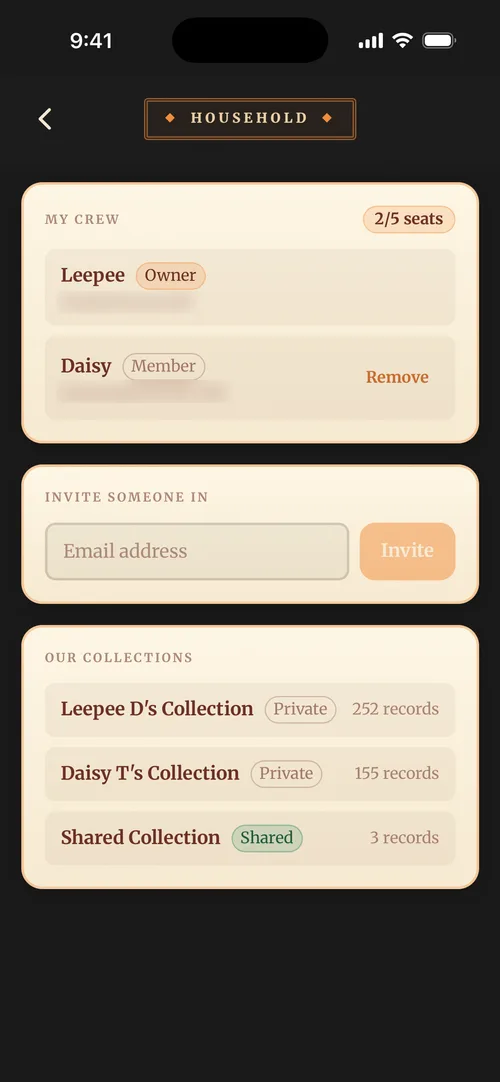
Duet plans have room for two people, Band plans for up to five, and My crew at the top of the screen shows who’s on the plan with a seat count beside it. If your plan is full, you’ll need to remove a member or move up to a bigger plan before inviting someone new.
They bring their records with them
If the person you invited already has a collection of their own, it comes with them. Their records, wishlist, notes, listening history and ratings all move into their own Private collection inside your plan, and their locations, crates, genres and tags merge into yours by name, so nothing is duplicated.
The app tells them exactly how many records will move before they accept, so it’s never a surprise on either side.
Two things can stop an invitation being accepted:
- They own a shared plan of their own with other members on it. They’ll need to disband that household first, since a person can only be in one.
- Your plan doesn’t have room for their records as well as yours. The invitation stays open, so upgrading to a bigger plan and asking them to try again is all it takes.
If they’re paying for their own subscription, the app warns them before they accept so they aren’t billed twice. See Joining someone else’s plan for their side of it.