Adding new tags
Create your own tags so you can group records any way you like.
Tags are yours to invent: moods, occasions, who gave you the record, birthday gifts, teen faves, or anything you’d finish “I’m in the mood for…”. Set them up once and they’re ready to hang on any record.
- Open the menu and choose Tags.
- Tap the +, give your tag a name, and add a description if it helps. The description is optional.
- Add a few more while you’re there, whatever labels suit your collection.
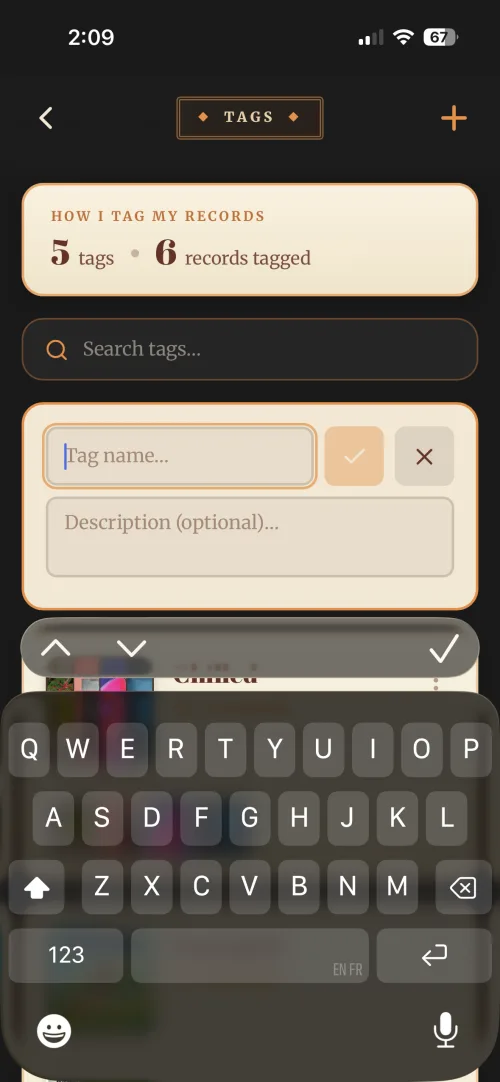
This screen is where tags are made, and it is the only place they’re made.
Once a tag exists there are two ways to hang it on a record, and they work from opposite ends. From this same Tags screen, tap a tag to open it and choose Edit records, which is the quicker way when you’re filing a batch at once. Or you can work from the record: open the record and tap the pencil on Record Information. Your tags appear there as a row of options, so tap the ones you want and hit Save.
The record only offers tags you’ve already created, so if the one you want isn’t in the list, come back here and make it first. Genres work the same way, made on the Genres screen and then picked on a record. See Organising with genres.
See Using tags to organise your collection for the whole picture.