Using tags to organise your collection
Tag records any way that makes sense to you, then filter to instant playlists.
Tags do two jobs, and it helps to keep them apart. First, your tag list: your own personal set of labels, created and kept in one place. Second, tagging records: hanging those labels on individual records so you can filter your collection by them.
Tags let you organise your records any way that makes sense to you. Genre is the obvious one, but tags really shine for the personal stuff: Sunday mornings, dinner party, Dad’s records, first pressings.
- Make your tags: open the menu, choose Tags, tap the + and add a new tag (add a few while you’re there). This is the only place tags are created.
- Tag your records, working from whichever end suits, the tag or the record. Both are below.
- Filter by a tag to pull up just that slice of the collection.
Tagging a batch, from the tag
This is the quicker way when you’re filing a stack of records at once.
- Open Tags in the menu and tap the tag you want.
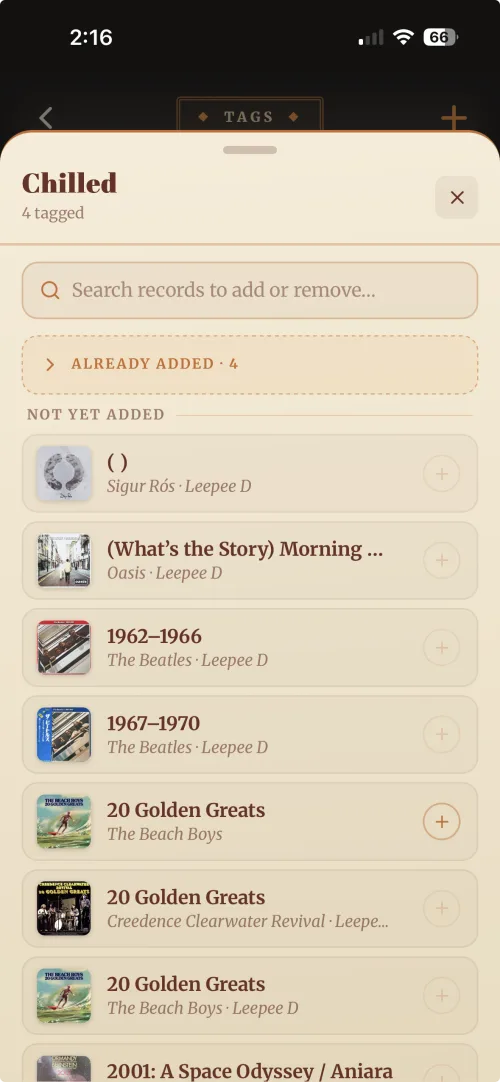
- Choose Edit records. A sheet opens with your collection split in two.
- Not yet added is everything without the tag. Tap the + beside a record to hang the tag on it.
- Already added sits above it as a count. Open it to see what’s carrying the tag, and to take the tag back off.
The search box at the top covers both lists, so you can go straight to a record by name rather than scrolling for it.
Tagging one record, from the record
Open the record and tap the pencil on Record Information. Your tags appear as a row of options, so tap the ones you want (as many as you like) and hit Save. Only tags you’ve already made show up here, so if the one you want is missing, go and create it first.
That’s the payoff: a tag becomes an instant playlist for whatever the moment calls for. See Adding new tags for more on setting up your tag list.