Making a crate
Group records any way you like, without moving them or changing where they live.
A crate is a group of records you’ve put together yourself: Sunday morning, the ones you’d save from a fire, records to take to Dave’s. It’s the loosest way to organise, and the most personal.
A crate doesn’t move anything. A record can sit in as many crates as you like while staying exactly where it is on the shelf, so nothing you’ve catalogued gets disturbed.
Making one
- Open the menu and choose Crates.
- Tap the + at the top right.
- Give it a name, add a description if you want one, and save.
The crate is ready straight away, empty and waiting.
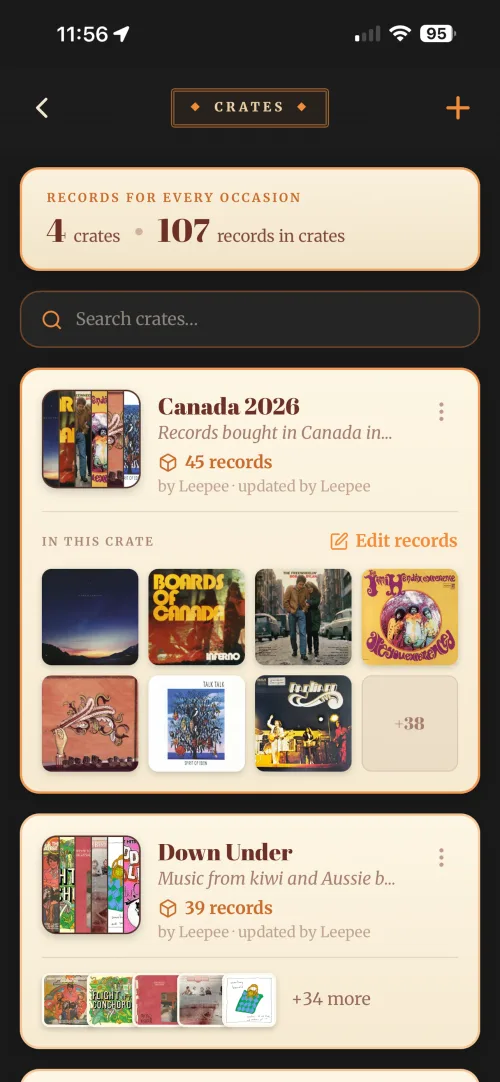
Putting records in it
- On the Crates screen, tap the crate to open it up.
- Tap Edit records.
- Search or scroll, and tap + on each record you want. It moves up into Already added as you go.
- To take one out, open Already added and tap it again.
Changes save as you make them, so there’s no separate save step. Close the panel when you’re done.
Back on the Crates screen, each crate shows a stack of its covers and the number of records inside, so you can see what’s in one at a glance.
Renaming or deleting a crate
Tap the kebab menu on a crate’s card for Edit and Delete. Deleting a crate only undoes the grouping. Every record in it stays in your collection.
Crates, tags, genres or locations?
They do different jobs, and most collections end up using all four:
- A crate is a hand-picked group, for whatever reason you like. See this article.
- A tag is a label you can put on many records and filter by, good for moods and themes. See Using tags to organise your collection.
- A genre describes what the music is. See Organising with genres.
- A location is where the record physically lives. See Setting storage locations.
You need a connection to create, rename or delete a crate. Adding records to one works offline and syncs when you’re back. See How offline mode works.