Downloading your collection for offline
Cache every cover in advance so your collection looks right in a basement with no signal.
Your records sync to your phone on their own, so offline browsing works with nothing switched on. See How offline mode works.
Cover art is the exception. Covers are images, and they’re cached as you come across them, so a record you haven’t looked at in a while may show a placeholder when you’re offline.
If you’re heading somewhere with no signal and you want the whole thing looking right, download it in advance.
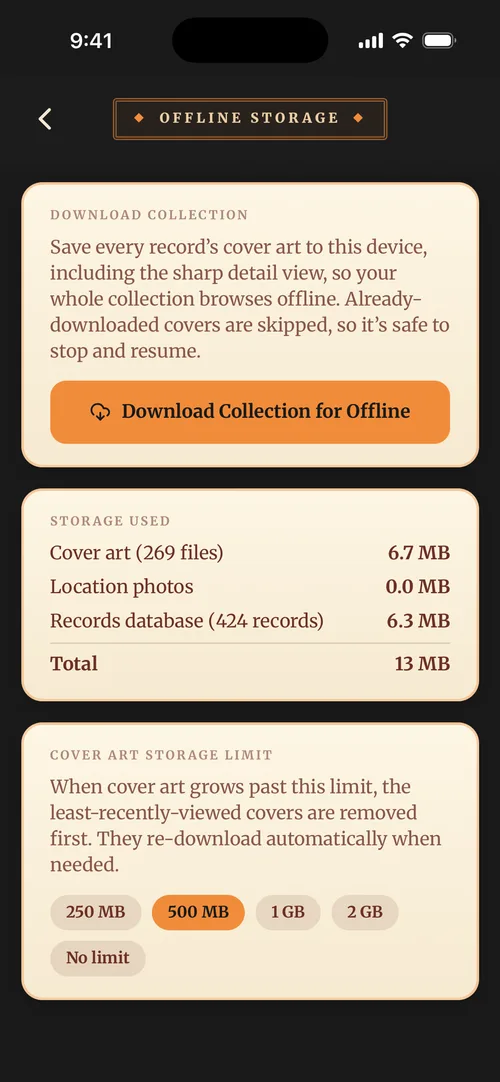
- Open Preferences → Offline Storage.
- Under Download Collection, tap Download Collection for Offline.
- Leave it running. A progress bar shows how far through it is.
This is a phone feature, on iPhone and Android. There’s no equivalent on the web, where you’ll need a connection anyway.
Worth knowing
Do it on Wi-Fi. Covers are the biggest thing in your collection by far, and a large library over mobile data adds up. The app warns you if you start a download off Wi-Fi.
You control how much space it takes. The same screen shows what’s currently stored and lets you set a cap. Once you hit it, the covers you haven’t looked at in longest make way for newer ones, so the app never quietly fills your phone.
You can stop and come back. A download picks up where it left off rather than starting again.